
学際創成学術院 / Graduate School of Integrative and Global Multidisciplinary Arena (G-SIGMA)
出願期間 / Application Period
下記の期間に入力し出願することができます。
Web Entry system is available during the following period:
博士前期課程(10月実施)/ Master's Program (October Selection Process)
博士後期課程(10月実施)/ Doctoral Program (October Selection Process)
令和8年(2026年)9月1日(火)12時~令和8年(2026年)9月30日(水)15時
September 1, 2026 (from 12 p.m. JST)~September 30, 2026 (by 3 p.m. JST)
出願前に必ず募集要項と下記の項目を確認してください。
Please read the application guideline and following topics carefully before starting Web Entry.
Web出願の流れ / Flowchart for Web Entry
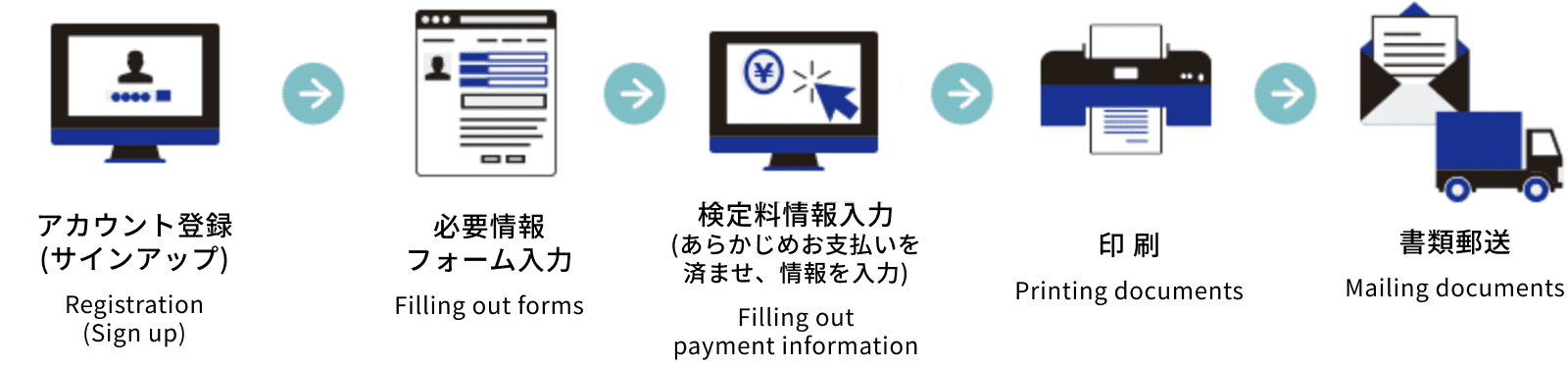
推奨環境 / System Requirements
PCブラウザバージョン / PC Browsers and Versions
| On Windows | On Mac |
|---|---|
|
|
PDF閲覧ソフトバージョン / PDF Viewers and Versions
| On Windows | On Mac |
|---|---|
※Windows 8.Xのリーダーは推奨環境ではありません。 * Acrobat Reader on Windows 8.X is not a recommended environment. |
※MacOSのプレビューは推奨環境ではありません。 * Preview on Mac OS is not a recommended environment. |
※PC環境でのご利用を推奨します。(モバイル端末不可) モバイル端末からご利用、入力いただいた場合、論文の入力、PDFの印刷などに対応できない場合がございますので、快適に閲覧しご入力いただくためには、あらかじめPCをご準備いただくことを推奨します。
It is recommended that you use a PC (not mobile devices). If you use mobile devices to fill out forms, errors may occur when entering a thesis or printing a PDF. To use the web entry system efficiently, please use a PC.
出願前の準備について / On Preparation for Web Entry
- メールアドレスを準備してください。
Enter Your Email Address.
アカウント作成のためのメールアドレスが必要になります。PC用のメールアドレスを準備し、 "webentry.ap-graduate.tsukuba.ac.jp"ドメインのメールが受け取れるよう、あらかじめフィルタリング等の設定を確認してください。
An email address is required to create your account. Enter an email address for your PC and configure filtering settings to receive emails from the "webentry.ap-graduate.tsukuba.ac.jp" domain. - 検定料支払い情報を準備してください。
Prepare Payment Information
このWeb入力システム中での、実際のお支払いはできません。あらかじめ募集要項をよく読み、検定料のお支払いを済ませ、Web入力システムに情報を入力してください。
Payment cannot be made through this web entry system. Please read the application guidelines carefully, submit payment for the application fee, and enter information on the web entry system. - プリンターの準備をしてください。
Prepare to Print Documents
出願完了後に、必要書類がPDF形式で出力されます。募集要項の指示に従い、書類を印刷し、郵送にて提出してください。
Necessary documents can be downloaded in PDF format after completing the web entry requirements. Follow instructions per the application guidelines, print the completed documents, and submit by registered mail. -
その他注意事項をご確認ください。
Please read other applicable notices.
- 環境によっては情報入力途中でブラウザを放置するとシステムエラーとなり、保存された時点に戻り、それまでに入力した情報は失われます。こまめな保存をお勧めします。
If you leave the browser for more than 30 minutes in the process of entering information, an error will occur and information you entered will be lost. Please save the information you enter frequently. - フォームの入力、検定料情報を入力しても、出願ボタンをクリックするまでは出願は確定していません。押し忘れにご注意ください。
Even if you complete the required forms, web entry will not be complete until you click the “submit” button. Please do not forget to click this button. - 必要書類の印刷は、出願期間内に行ってください。期間を過ぎるとログインできなくなります。
Please print the necessary documents within the application period. You will not be able to log in after the application period has closed.
- 環境によっては情報入力途中でブラウザを放置するとシステムエラーとなり、保存された時点に戻り、それまでに入力した情報は失われます。こまめな保存をお勧めします。
オンラインで出願するには、まずサインアップしてください。
In order for you to apply online, you must signup first.
2回目からは、下からログインしてください。
From the second time, please log in below.